# java
# 事务区别
@Transactional(rollbackFor =Exception.class)
所有异常都会回滚,
@Transactional
只有运行时异常会回滚
throw new BusinessException("退款失败");
# 同一个实现类事务失效
# 方法1 自调用走代理(最快)
import org.springframework.aop.framework.AopContext;

@Slf4j
@Service
@EnableAspectJAutoProxy(exposeProxy = true)
public class PointSmallOrderRefundServiceImpl implements PointSmallOrderRefundService {

    public void methodA() {
        ((PointSmallOrderRefundService) AopContext.currentProxy()).methodB();
    }

    @Transactional
    public void methodB() {
        // 事务逻辑
    }
}
# 方法2 拆到另一个 Service(最推荐)
@Service
public class OrderService {

    @Autowired
    private OrderTxService orderTxService;

    public void methodA() {
        orderTxService.methodB();
    }
}

@Service
public class OrderTxService {

    @Transactional
    public void methodB() {
        // 事务逻辑
    }
}
# 方法3 ApplicationContext 取自己
@Autowired
private ApplicationContext applicationContext;

public void methodA() {
    applicationContext.getBean(YourService.class).methodB();
}
# mq死锁问题
在 @RabbitListener 中,Spring AMQP 会自动管理 Channel 生命周期,消息处理完成后框架会自动归还 Channel 到缓存。手动调用 channel.close() 会:
触发 CachedChannelInvocationHandler.logicalClose() → returnToCache() → setAfterAckCallback() 此过程需要获取 PublisherCallbackChannelImpl(锁B),但当前线程已持有 LinkedList(锁A) 与此同时,AMQP Connection 线程持有锁B,需要锁A,形成 ABBA 死锁
# 线程日志
"org.springframework.amqp.rabbit.RabbitListenerEndpointContainer#0-1":
	at org.springframework.amqp.rabbit.connection.PublisherCallbackChannelImpl.setAfterAckCallback(PublisherCallbackChannelImpl.java:135)
	- waiting to lock <0x00000000895827e8> (a org.springframework.amqp.rabbit.connection.PublisherCallbackChannelImpl)
	at sun.reflect.GeneratedMethodAccessor1057.invoke(Unknown Source)
	at sun.reflect.DelegatingMethodAccessorImpl.invoke(DelegatingMethodAccessorImpl.java:43)
	at java.lang.reflect.Method.invoke(Method.java:498)
	at org.springframework.amqp.rabbit.connection.CachingConnectionFactory$CachedChannelInvocationHandler.invoke(CachingConnectionFactory.java:1110)
	- locked <0x0000000089582d10> (a java.lang.Object)
	at com.sun.proxy.$Proxy638.setAfterAckCallback(Unknown Source)
	at org.springframework.amqp.rabbit.connection.CachingConnectionFactory$CachedChannelInvocationHandler.returnToCache(CachingConnectionFactory.java:1198)
	at org.springframework.amqp.rabbit.connection.CachingConnectionFactory$CachedChannelInvocationHandler.logicalClose(CachingConnectionFactory.java:1189)
	at org.springframework.amqp.rabbit.connection.CachingConnectionFactory$CachedChannelInvocationHandler.invoke(CachingConnectionFactory.java:1063)
	- locked <0x000000008285dae0> (a java.util.LinkedList)
# 方案1 代码优化(移除channel.close())
@RabbitListener
public void consume(
    Message message,
    Channel channel,
    @Header(AmqpHeaders.DELIVERY_TAG) long tag){

    try{
        //业务处理
        channel.basicAck(tag,false);
        //channel.close();
    }catch(Exception e){
        channel.basicNack(tag,false,true);
    }

}
# 方案2 升级mq版本
Spring Boot 2.7.x + Spring AMQP 2.4.x + RabbitMQ 3.12/3.13
# java项目改成web项目
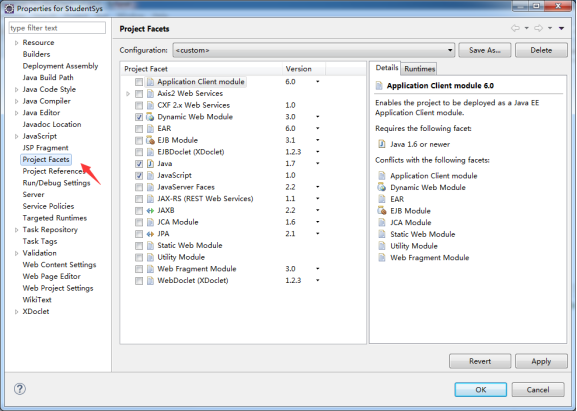
在项目上点右键,进入属性(properties),在左侧列表项目中点击选择“Project Facets”,在右侧选择“Dynamic Web Module”和"Java",点击OK保存即可。
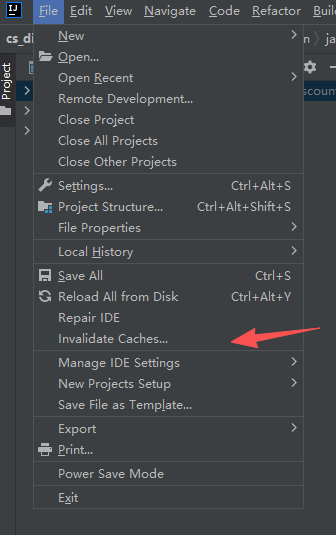
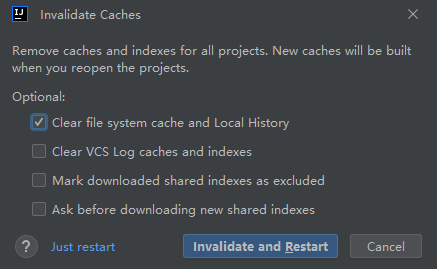
# idea清除缓存
# Tomcat无法启动
Server Tomcat v7.0 Server at localhost failed to start.
出现这个问题是因为web.xml里的配置不对
Tomcat在eclipse里面能正常启动,而在浏览器中访问http://localhost:8080/不能访问,且报404错
参考链接:
http://blog.csdn.net/qq_32131499/article/details/50803479
http://www.educity.cn/wenda/466412.html
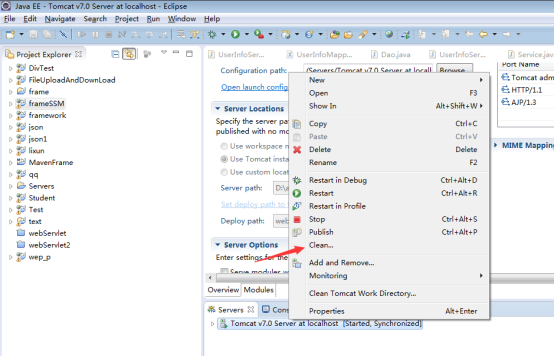
通过右键单击tomcat服务器选择 Add and Remove,在弹出的对话框中移除已部署的项目
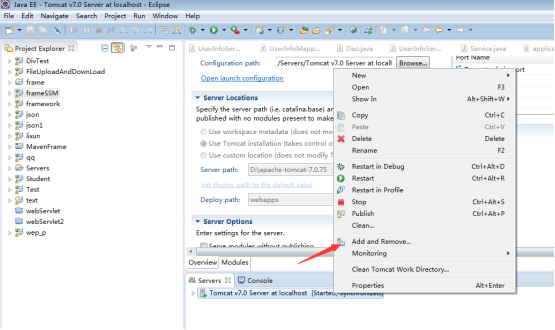
通过右键单击tomcat服务器选择 Clean之后就可以编辑
双击tomcat服务器,将Use workspace metadata修改为Use Tomcat installation,
修改"Deploy Path",将值默认是"wtpwebapps",把它改成"webapps"
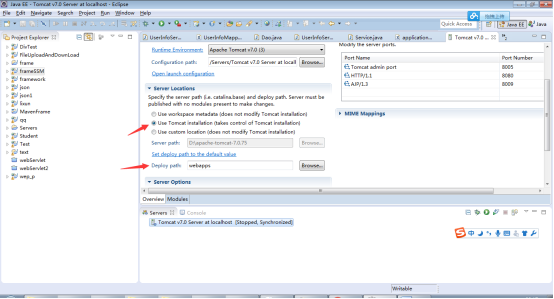
重启tomcat服务器,访问http://localhost:8080 (opens new window)则能正常访问了
//fastjson
//1将对象转换成为字符串
String str = JSON.toJSONString(infoDo);

//2将字符串转换成为对象
InfoDo infoDo = JSON.parseObject(strInfoDo, InfoDo.class);

JSONObject jsonObject = JSONObject.parseObject(str);

Map<String, Object> map2 = (Map) JSON.parse(json);

//3将对象集合转换成为字符串
String users = JSON.toJSONString(users);

//4将字符串转换成为对象集合
List<User> userList = JSON.parseArray(userStr, User.class);


JSONUtils.toJSONString(map);


//CacheAPI

//BigDecimal 比较大小

BigDecimal a = new BigDecimal (101);
BigDecimal b = new BigDecimal (111);

//使用compareTo方法比较
//注意:a、b均不能为null,否则会报空指针
if(a.compareTo(b) == -1){
    System.out.println("a小于b");
}

if(a.compareTo(b) == 0){
    System.out.println("a等于b");
}

if(a.compareTo(b) == 1){
    System.out.println("a大于b");
}

if(a.compareTo(b) > -1){
    System.out.println("a大于等于b");
}

if(a.compareTo(b) < 1){
    System.out.println("a小于等于b");
}

String 转date
DateUtils.parseDate("2018-01-31","yyyy-MM-dd HH:mm:ss")
date 转 string
String date = DateFormatUtils.format(new Date(), "yyyy-MM-dd");


# map前匹配
https://issues.apache.org/jira/browse/COLLECTIONS-586
        Trie<String,String> lm = new PatriciaTrie<String>();
        lm.put("a.a1","11");
        lm.put("a.a12","12");
        lm.put("b.b1","13");
        lm.put("c.c1","14");
        lm.put("c.c1","15");
        SortedMap<String, String> prefixMap = lm.prefixMap("a.");
        System.out.println(prefixMap.toString());


		// LocalDate类 获取当前日期

		LocalDate date = LocalDate.now();
		System.out.print(date.getYear() + "年");
		System.out.print(date.getMonthValue() + "月");
		System.out.println(date.getDayOfMonth() + "日");
		System.out.println(date.toString());

		// LocalTime类 获取当前时间
		LocalTime time = LocalTime.now();
		System.out.print(time.getHour() + "时");
		System.out.print(time.getMinute() + "分");
		System.out.println(time.getSecond() + "秒");
		System.out.println(time.toString());

		// LocalDateTime类 获取年月日时分秒
		LocalDateTime date2 = LocalDateTime.now();
		System.out.print(date2.getYear() + "年");
		System.out.print(date2.getMonthValue() + "月");
		System.out.print(date2.getDayOfMonth() + "日");
		System.out.print(date2.getHour() + "时");
		System.out.print(date2.getMinute() + "分");
		System.out.println(date2.getSecond() + "秒");
		System.out.println(date2.toString());

		//DateTimeFormatter类 解析日期格式
		DateTimeFormatter formatter = DateTimeFormatter.ofPattern("yyyy-MM-dd:HH:mm:ss");
		LocalDateTime date3 = LocalDateTime.parse("2017-05-15:12:30:50",formatter);
		System.out.println(date3);

		//ZonedDateTime类   将日期转成字符串
		ZonedDateTime date4 = ZonedDateTime.now();
		DateTimeFormatter format = DateTimeFormatter.ofPattern("yyyy-MM-dd:HH:mm:ss");
		String strDate = date4.format(format);
		System.out.println(strDate);


idea插件
    RestfulToolkit
Jsoup发送https请求的问题 https://www.cnblogs.com/ylz8401/p/6795933.html https://www.cnblogs.com/Retired-lad/p/16229178.html
← Arthas 阿尔萨斯 jvm →