Ansible
# 介绍
ansible是一款开源自动化平台,是一个配置管理工具,自动化运维工具
# 安装
#查看版本
ansible --version
#安装
yum install ansible
yum install epel-release


#卸载
sudo yum remove ansible


/etc/ansible/ansible.conf    ##全局配置文件,默认很少修改
/etc/ansible/hosts           ##全局主机清单清单文件


/etc/ansible/ansible.cfg  #基本配置文件,找不到其他配置文件此文件生效,优先级最低
~/.ansible                #用户当前目录中没有ansible.cfg此文件生效
./ansible.cfg             #优先级最高
                          #执行ansible命令的目录中如果有ansible.cfg,就用它,不使用上面两个(推荐使用,上面两个不常用)。


#配置文件参数
[default]              ##基本信息设定
inventory=             ##指定清单路径
remote_user=           ##在受管主机上登陆的用户名称,未指定使用当前用户
ask_pass=              ##是否提示输入SSH密码,如果公钥登陆设定为false
library=               ##库文件存放目录
local_tmp=             ##本机临时命令执行目录
remote_tmp=            ##远程主机临时py命令文件存放目录
forks=                 ##默认并发数量
host_key_checking=     ##第一次连接受管主机时是否要输入yes建立host_key
sudo_user=             ##默认sudo用户
ask_sudo_pass=         ##每次在受控主机执行ansible命令时是否询问sudo密码
module_name=           ##默认模块,默认使用command,可以修改为shell
log_path=              ##日志文件路径

[privilege_escalation] ##身份信息设定(配置 ansible 如何在受管主机上执行特权升)
become=                ##连接后是否自动切换用户
become_method=         ##设定切换用户的方式,通常用sudo
become_user=           ##在受管主机中切换到的用户,通常为root
become_ask_pass        ##是否需要为become_method提示输入密码,默认为false
# 使用
#语法:[start:end]
例子:
[westostest]
172.25.254.[100:108]

172.25.[0:4].[0:254]    #匹配172.25.0.0/24,172.25.1.0/24 …
server[01:10].example.com #匹配server01.example.com到server10.example.com所有主机
[a:c].example.com      #匹配a.example.com到c.example.com


#测试默认清单
vim /etc/ansible/hosts

172.25.254.240
[westostest]
172.25.254.100
172.25.254.200

#测试
ansible all --list-hosts                         ##列出主机
ansible westostest --list-hosts     ##列出westostest组中的主机
ansible ungrouped --list-hosts     ##列出不在westostest组中的主机

#自定义清单
cd /etc/ansible/test
vim /etc/ansible/test/inventory

172.25.254.243
[westostest1]
172.25.254.101
172.25.254.201
[westostest2]
172.25.254.102
172.25.254.202
[westostest3]
172.25.254.103
172.25.254.203

#测试
ansible all --list-hosts -i inventory            ##列出主机,-i 指定文件
ansible westostest --list-hosts -i inventory     ##列出westostest组中的主机
ansible ungrouped --list-hosts -i inventory       ##列出不在组中的主机


#ansible正则表达式
*     ##所有
      ##172.25.254.*
      ##westos*

:     ##逻辑或
      ##westos1:linux
      ##172.25.254.100:172.25.254.200

:&    ##逻辑与
      ##westos1:&linux
      ##主机即在westos1清单也在linux清单中

:!    ##逻辑非
      ##westos1:!linux
      ##在westos1中不在linux中

~              ##以关键字开头
~(str1|str2)   ##以条件1或者条件2开头


#测试
ansible "west*" --list-hosts -i inventory   ##前匹配west
ansible "westostest1:westostest2" --list-hosts -i inventory   ##逻辑或
ansible "westostest1:&westostest2" --list-hosts -i inventory   ##逻辑与
ansible "~west" --list-hosts -i inventory   ##以west开头
# 免密
#设置免密
vim /etc/ansible/ansible.cfg

host_key_checking = False
ask_pass = False

#生成ssh
ssh-keygen -t rsa
ls ~/.ssh/


#远程测试脚本
cd /root/.ansible/

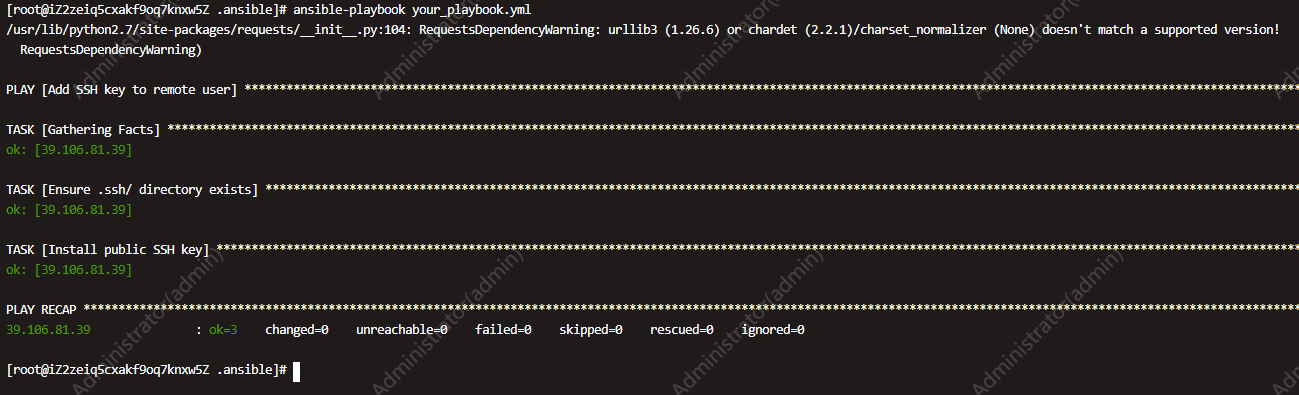
vim your_playbook.yml

- name: Add SSH key to remote user
  hosts: prod-team  # 替换为你的目标主机组名
  become: yes
  tasks:
    - name: Ensure .ssh/ directory exists
      file:
        path: ~/.ssh
        state: directory
        mode: 0700
        owner: root  # 替换为远程主机的用户名

    - name: Install public SSH key
      authorized_key:
        user: root  # 替换为远程主机的用户名
        state: present
        key: "{{ lookup('file', '/root/.ssh/id_rsa.pub') }}"  # 假设公钥文件位于/root/.ssh/


ansible-playbook your_playbook.yml


#禁用
cd /root/.ssh

#修改ssh配置(远程服务器)
sudo vim /etc/ssh/sshd_config
PasswordAuthentication yes

#重启sshd(远程服务器)
sudo systemctl restart sshd.service
# 使用密码无法登录Linux系统ECS实例
#参考 https://help.aliyun.com/zh/ecs/support/use-the-password-can-t-login-the-linux-cloud-server-ecs-what-should-i-do

#修改ssh配置
sudo vim /etc/ssh/sshd_config
PasswordAuthentication yes

#重启sshd
sudo systemctl restart sshd.service