# Spring Cloud
参考项目:lx-netflix
#pom
    <parent>
        <groupId>org.springframework.boot</groupId>
        <artifactId>spring-boot-starter-parent</artifactId>
        <version>2.0.3.RELEASE</version>
    </parent>

    <dependency>
        <groupId>org.springframework.cloud</groupId>
        <artifactId>spring-cloud-dependencies</artifactId>
        <version>${spring-cloud.version}</version>
        <type>pom</type>
        <scope>import</scope>
    </dependency>

<spring-cloud.version>Finchley.RELEASE</spring-cloud.version>
# Eureka
实现服务注册与发现
客户端向server发送心跳检测(默认30秒),如果90秒内没有收到心跳则会移除该节点。
发生分区网络故障,15分钟内85%节点没有检测到心跳,会进入自我保护模式,会出现以下几种情况:
- eureka不再从注册列表移除因为长时间没有发送心跳而过期的服务
- eureka依然可以接受新的节点的注册和查询,但不会同步到其他节点上。
- 网络稳定时,新注册的节点会同步到其他节点上。
#pom
    <dependency>
        <groupId>org.springframework.cloud</groupId>
        <artifactId>spring-cloud-starter-netflix-eureka-server</artifactId>
    </dependency>
#启动类
@EnableEurekaServer

#yml
eureka:
  instance:
    hostname: localhost
  client:
    registerWithEureka: false
    fetchRegistry: false
    serviceUrl:
      defaultZone: http://${eureka.instance.hostname}:${server.port}/eureka/

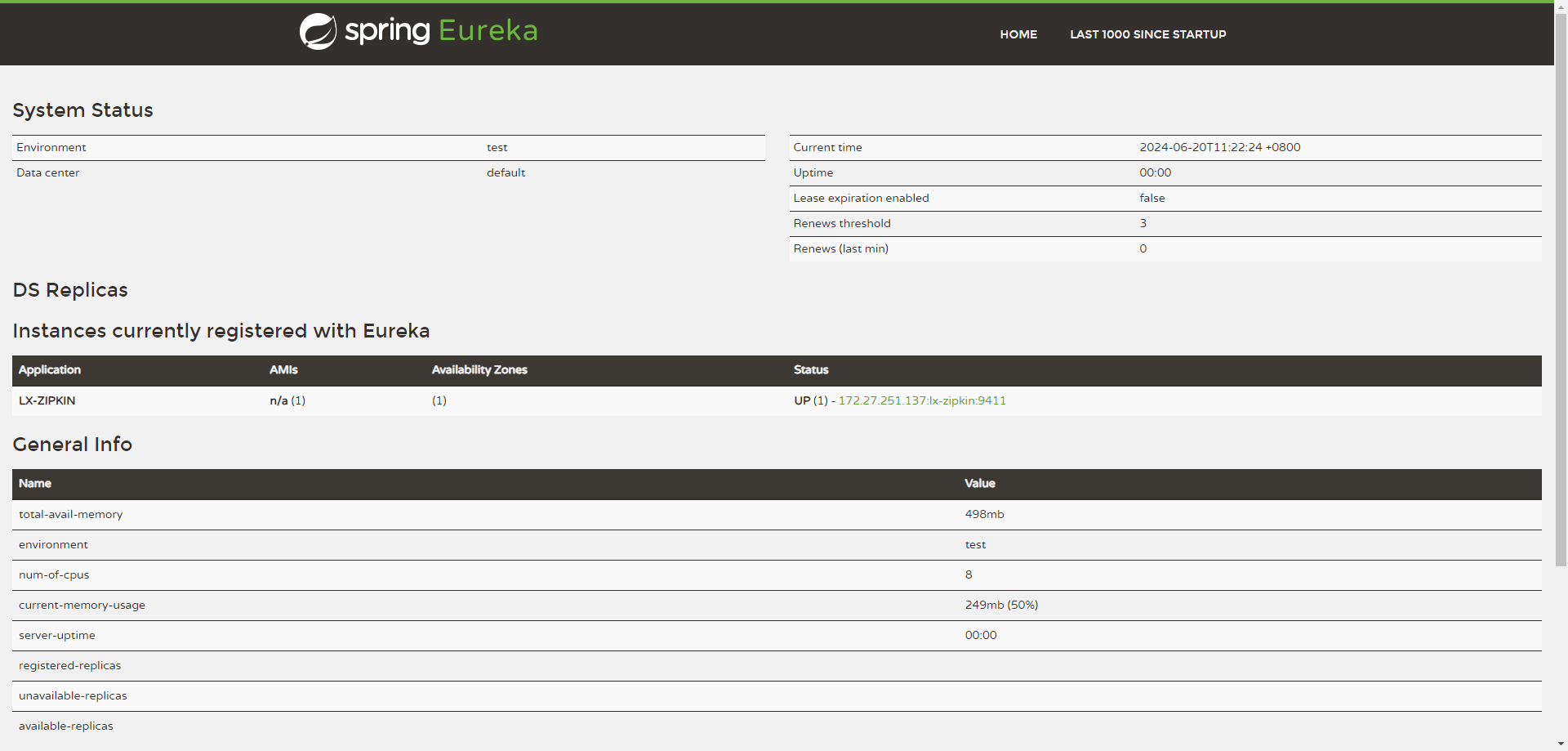
#启动lx-eureka
http://localhost:8761/
# Spring Cloud Config
在分布式系统中,由于服务数量巨多,为了方便服务配置文件统一管理,实时更新,所以需要分布式配置中心组件。在Spring Cloud中,有分布式配置中心组件spring cloud config ,它支持配置服务放在配置服务的内存中(即本地),也支持放在远程Git仓库中。在spring cloud config 组件中,分两个角色,一是config server,二是config client。
使用: 1、添加pom依赖 2、配置文件添加相关配置 3、启动类添加注解@EnableConfigServer
#pom
    <dependency>
        <groupId>org.springframework.cloud</groupId>
        <artifactId>spring-cloud-config-server</artifactId>
    </dependency>

#启动类
@EnableConfigServer

#yml
spring:
  cloud:
    config:
      label: master
      server:
        git:
          uri: https://code.aliyun.com/meteorplan/lx-netflix.git
          search-paths: spring-cloud-config/respo
          username: meteorplan
          password: li00000000
          force-pull: true

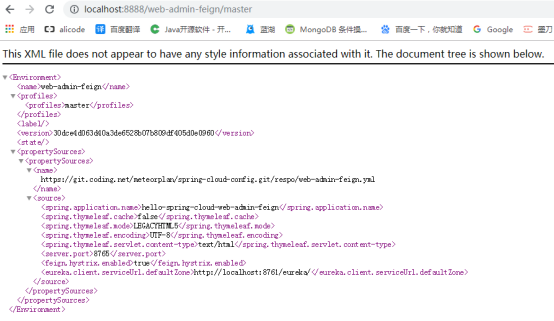
#测试config
http://localhost:8888/web-admin-feign/master

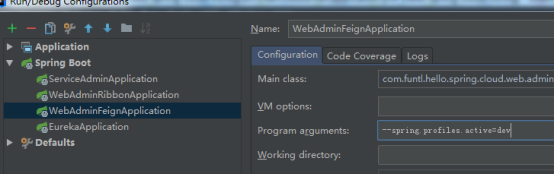
#多环境配置,通过修改dev,test,prod启动后显示不同端口则配置成功
--spring.profiles.active=dev
# Ribbon
客户端的负载均衡
#pom
    <dependency>
        <groupId>org.springframework.cloud</groupId>
        <artifactId>spring-cloud-starter-netflix-ribbon</artifactId>
    </dependency>

#启动类
@EnableDiscoveryClient

#yml 注册eureka
eureka:
  client:
    serviceUrl:
      defaultZone: http://localhost:8761/eureka/

#Service类
@HystrixCommand(fallbackMethod = "hiError")


#启动服务提供者lx-service-admin,开启两个端口8762,8763
http://localhost:8762/hi?message=HelloSpring
http://localhost:8763/hi?message=HelloSpring

#启动lx-admin-ribbon服务,重复请求会轮询 8762和8763
http://localhost:8764/hi?message=HelloRibbon
# Feign
客户端的负载均衡
1.feign采用的是基于接口的注解 2.feign整合了ribbon,具有负载均衡的能力 3.整合了Hystrix,具有熔断的能力
#pom
	<dependency>
        <groupId>org.springframework.cloud</groupId>
        <artifactId>spring-cloud-starter-openfeign</artifactId>
    </dependency>

#启动类
@EnableDiscoveryClient
@EnableFeignClients

#yml
feign:
  hystrix:
    enabled: true

#Service类
@FeignClient(value = "lx-service-admin", fallback = AdminServiceHystrix.class)

#启动lx-admin-feign服务,重复请求会轮询 8762和8763
http://localhost:8765/hi?message=HelloFeign
# Hystrix
熔断器,服务降级
防雪崩利器,具备服务降级,服务熔断,依赖隔离,监控(Hystrix Dashboard)
当一个服务调用另一个服务由于网络原因或自身原因出现问题,调用者就会等待被调用者的响应 当更多的服务请求到这些资源导致更多的请求等待,发生连锁效应(雪崩效应) 断路器有完全打开状态:一段时间内 达到一定的次数无法调用 并且多次监测没有恢复的迹象 断路器完全打开 那么下次请求就不会请求到该服务 半开:短时间内 有恢复迹象 断路器会将部分请求发给该服务,正常调用时 断路器关闭 关闭:当服务一直处于正常状态 能正常调用
#pom
    <dependency>
        <groupId>org.springframework.cloud</groupId>
        <artifactId>spring-cloud-starter-netflix-hystrix</artifactId>
    </dependency>
    <dependency>
        <groupId>org.springframework.cloud</groupId>
        <artifactId>spring-cloud-starter-netflix-hystrix-dashboard</artifactId>
    </dependency>

#启动类
@EnableHystrix
@EnableHystrixDashboard

#yml
feign:
  hystrix:
    enabled: true

#访问ribbon
http://localhost:8764/hi?message=HelloRibbon
#访问feign
http://localhost:8765/hi?message=HelloFeign
# hystrix仪表盘
(ribbon和feign都已集成)

#ribbon访问地址
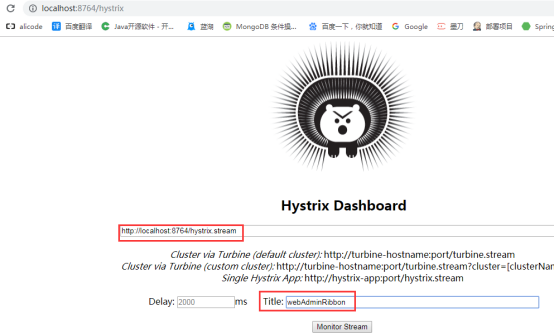
http://localhost:8764/hystrix

#参数:
http://localhost:8764/hystrix.stream
title:自定义名字
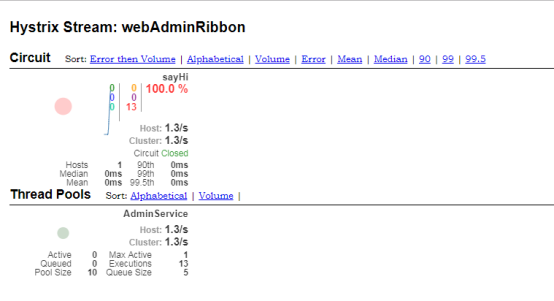
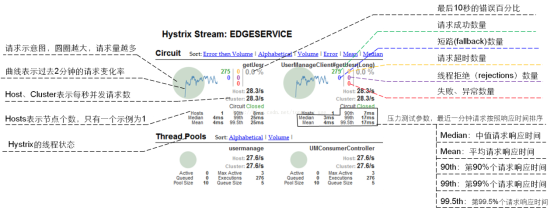
触发熔断器后显示如下图:
# Zuul
网关 代理,路由,过滤
#pom
	<dependency>
        <groupId>org.springframework.cloud</groupId>
        <artifactId>spring-cloud-starter-netflix-zuul</artifactId>
    </dependency>

#启动类
@EnableZuulProxy

#yml
zuul:
  routes:
    api-a:
      path: /api/a/**
      serviceId: web-admin-ribbon
    api-b:
      path: /api/b/**
      serviceId: web-admin-feign
    api-c:
      path: /api/c/**
      serviceId: lx-service-order

#启动lx-zuul,无token时无法访问
http://localhost:8769/api/a/hi?message=HelloZuul
http://localhost:8769/api/b/hi?message=HelloZuul&token=123
# Sleuth
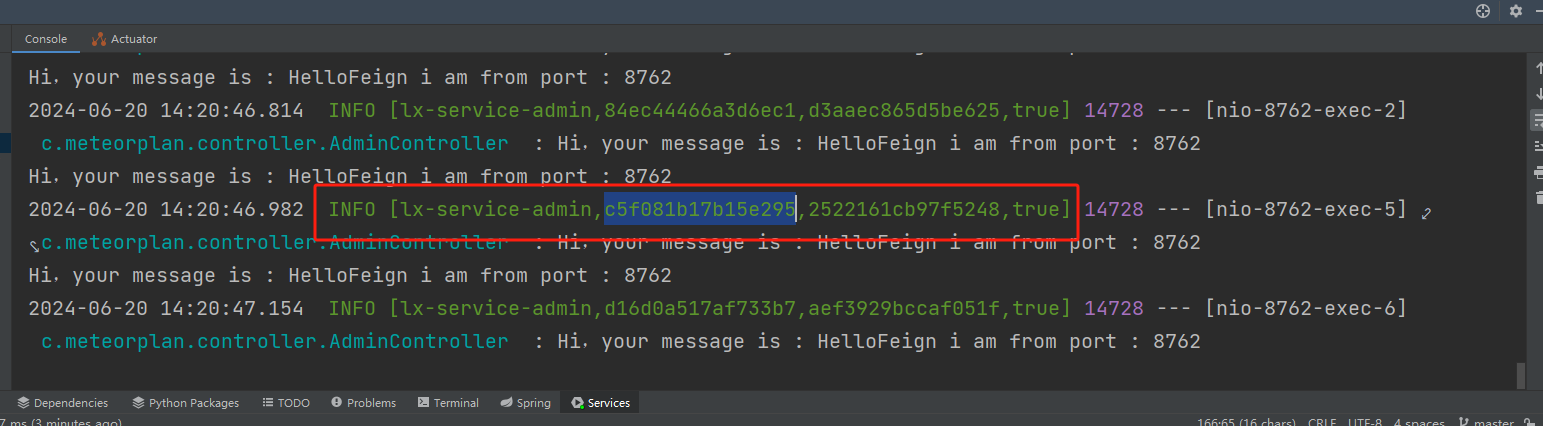
日志追踪,日志会显示traceId,配合zipkin分析日志,用traceId在zipkin右上角搜索对应日志
#pom
    <dependency>
        <groupId>org.springframework.cloud</groupId>
        <artifactId>spring-cloud-starter-sleuth</artifactId>
    </dependency>

#yml
spring:
  sleuth:
    sampler:
      probability: 1.0


#Logback或SLF4J打印日志,会显示[application name,trace id, span id]
# Zipkin
分布式链路追踪,分析
#pom
    <dependency>
        <groupId>io.zipkin.java</groupId>
        <artifactId>zipkin</artifactId>
        <version>${zipkin.version}</version>
    </dependency>
    <dependency>
        <groupId>io.zipkin.java</groupId>
        <artifactId>zipkin-server</artifactId>
        <version>${zipkin.version}</version>
        <!-- 排除日志jar冲突 -->
        <exclusions>
            <exclusion>
                <groupId>org.springframework.boot</groupId>
                <artifactId>spring-boot-starter-log4j2</artifactId>
            </exclusion>
        </exclusions>
    </dependency>
    <dependency>
        <groupId>io.zipkin.java</groupId>
        <artifactId>zipkin-autoconfigure-ui</artifactId>
        <version>${zipkin.version}</version>
    </dependency>

<zipkin.version>2.10.1</zipkin.version>

#启动类
@EnableZipkinServer

#lx-zipkin访问
http://localhost:9411
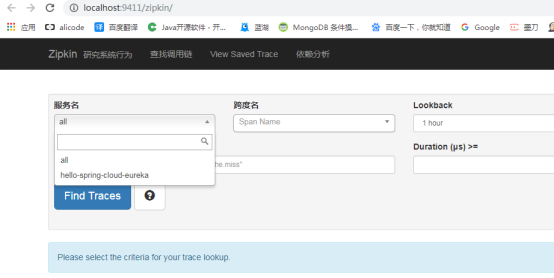
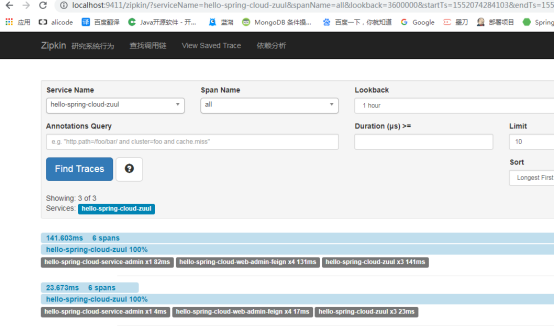
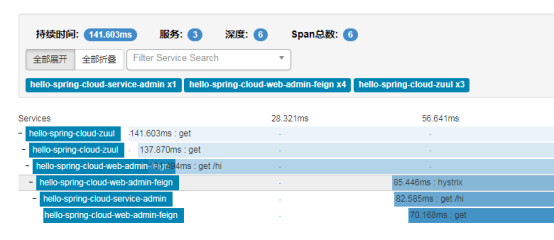
多次请求feign,点击find traces,点击查看可以看到请求的链路
# Spring boot admin
#pom
    <dependency>
        <groupId>de.codecentric</groupId>
        <artifactId>spring-boot-admin-starter-server</artifactId>
    </dependency>

#启动类
@EnableAdminServer

#lx-admin访问
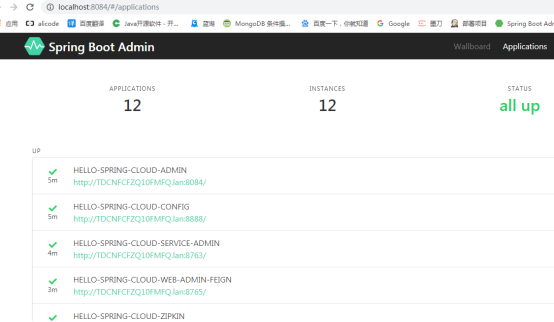
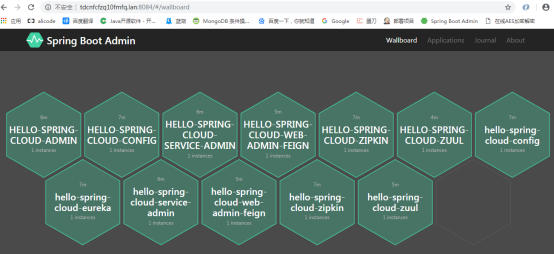
http://localhost:8084
# Bus
当配置中心(如github)的配置更新之后,系统不能立即感知到,只有重启系统后才能拿到最新的配置。 Bus结合config搭建配置中心,如果修改了配置文件,发送一次请求,所有的客户端便会重新读取配置文件。
lx-config服务
#service和client  pom
        <dependency>
            <groupId>org.springframework.cloud</groupId>
            <artifactId>spring-cloud-starter-bus-amqp</artifactId>
        </dependency>
        <!--eureka-client-->
        <dependency>
            <groupId>org.springframework.cloud</groupId>
            <artifactId>spring-cloud-starter-netflix-eureka-client</artifactId>
        </dependency>


#启动类
@RestController

#yml

spring:
  #rabbitmq配置
  rabbitmq:
    host: 172.17.110.248
    port: 5672
    username: guest
    password: guest


#暴露bus刷新配置端点
management:
  health:
    enabled: true
  endpoints:
    web:
      exposure:
        include: "bus-refresh"

# AdminController
    @Value("${lx.test}")
    private String name;

    @GetMapping("/configInfo")
    public String getName() {
        return name;
    }

#启动rabbitmq
docker pull rabbitmq:management

docker run -d --name="myrabbitmq" -p 5672:5672 -p 15672:15672 rabbitmq:management

docker ps

#访问rabbitmq
http://172.17.110.248:15672/
guest/guest


#查看config配置
http://localhost:8888/master/web-admin-feign-dev.yml
http://localhost:8888/master/web-admin-feign-prod.yml

#调用接口
http://localhost:8765/configInfo

#post请求(必须post请求)
http://localhost:8888/actuator/bus-refresh

#推送最新配置到具体的服务的具体节点
http://localhost:8888/actuator/bus-refresh/web-admin-feign-dev:8765